Migration from jeedom to home-assistant – Part 1 – Installation and configuration

In this first article, I will details the installation and configuration of my home-assistant

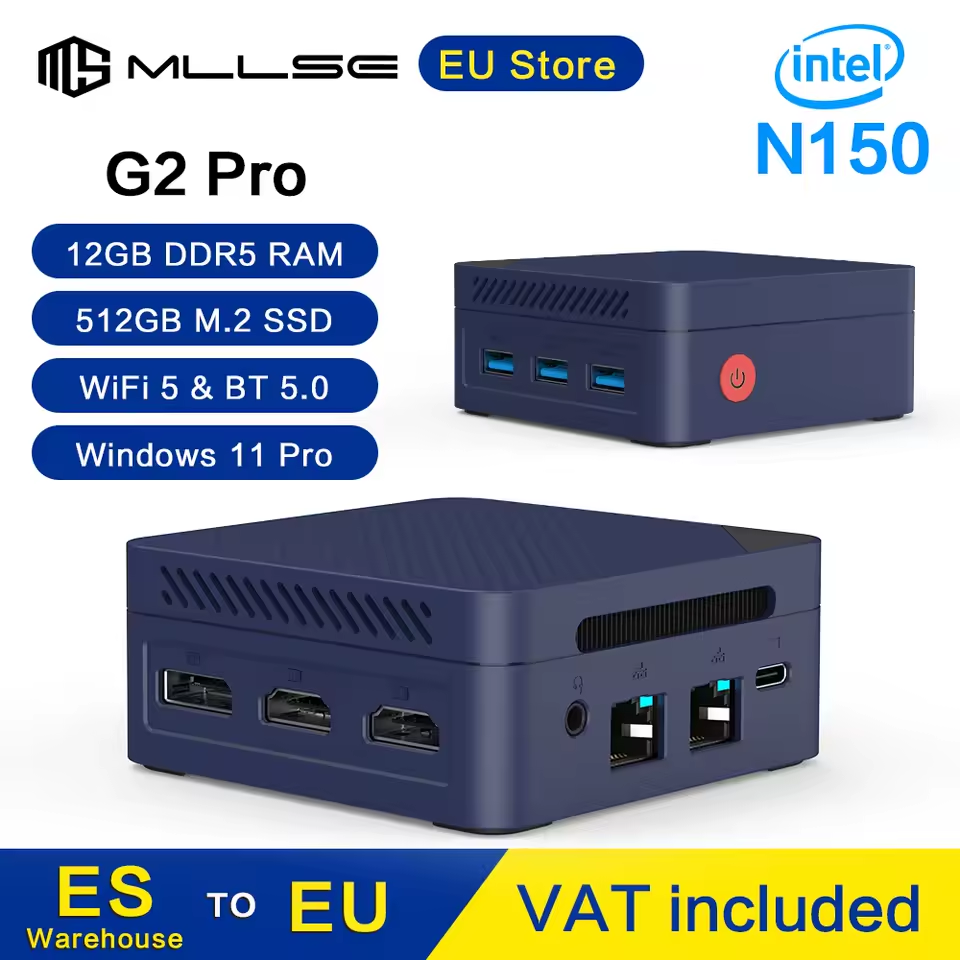
Try new material

My new MiniPC come with Windows pre-installed. So I launch it on the VERY VERY long process to configure windows 11… Thirtheen pop-up later, I can used my new material. But I will not keep Windows, nope 🙂

So … my first thing was to installed passmark to compare with others materials

PriceRatingCPU2D Graph3D GraphMem.DiskInfo
RockPi Radxa X4178$14355801
MLLSE G2 PRO120$13665978459103918582989500 Gio M2 SSD
RPi 5125$22551244

https://www.passmark.com/baselines/V11/display.php?id=312299225025

RockPi Radxa X4 test : https://nashraj.com/radxa-x4-review-an-n100-raspberry-pi-alternative/

Zigbee USB key

Long time ago, I buyed a ConBee II – zigbee key. It’s still supported by the ZHA integration but is not recommanded. Well, at least, it’s supported 🙂

I know I need to prepare to have the latest Zigbee firmware. Not difficult but as the process is more easy on windows, I decide to do it before delete everything on the miniPC.

By the way, I connect the zigbee key with a usb cable. As I know, it will reduce noise on antenna reception.

Install Home-Assistant

As the CPU is a Intel n150, it’s a X86-64 processor. Home-assistant have a good tutorial that you must follow:

https://www.home-assistant.io/installation/generic-x86-64

Nothing more to say. Run H-A installation process. Search after that for the IP (fixed it if possible)

Create first admin user etc. Success, it’s working 🙂

Hardware advanced configuration

Before installed the miniPC on my “server” area, I do some modification on its BIOS ; I set

  • wake-up-lan support (can be important)
  • Change power return from S5 to S0 – when electricity goes off on my house and then return, I don’t want to press a button to start home-assistant.

The BIOS was not the most friendly I have used. Old blue bios fashion.. But at least, there is one!

URL redirection

As I have a lot of docker, server etc. I used a Caddy to keep my website on https and have all redirection on one side – and my SSO.

So, as I don’t like to remember the home-assistant IP, I created a new subdomain and configure it from my caddy Docker, and add URL redirection in parameter.

Seems simple …

Then I update my Caddy params, try to launch with the URL and …

YEP : that’s my first failed (of a long series :D)

After a long search I launch ChatGPT that say

It’s a normal behaviour : you need to modify the default configuration.yaml and add a section to indicate that your server is a trust proxy to authorize this redirection. As example, if your Caddy server is set on ip 192.168.0.1

http:
  use_x_forwarded_for: true
  trusted_proxies: 192.168.0.1

NO. Sorry, ChatGPT, but NO. It’s not a normal behaviour that something as simple as a redirection that I declare in settings would implies to modify a file that I don’t ever know exists. I have used a lot of docker, install a lot of services and that’s barely the less friendly configure method for it.

Anyway : to modify this configuration.yaml… You need to access it.

And, no, you cannot access it directly from interface, there is no SMB protocol nor SFTP preconfigured on H-A and you cannot connect to SSH by default. I know because I try and failed… So what’s the good method ? Install an add-on for a protocol or install Studio Code Server to directly access it from your browser.

Install add-on Studio Code Server

Go to settings, add-ons, search for Studio Code Server, install it, run it if necessary, wait a minute and then click the open button. It’s barely Visual Studio Code Server that is configured to directly open all yaml files. It has autocompletion activated to be fully compliant with Home-Assistant.

So… I modify configuration.yaml with the code AND my IP. Then reload all integrations

And success!

First integrations installation

I try to add “simple integrations” : moon, sun and see what it’s look’s like.

Well by default, Home-Assistant create a home-page and add all elements to it. It’s not the best view possible, but it’s working. I will have to modify it later

Configure home-assistant on smartphone

I installed the official apps on iOS (iPhone) and android (Samsung S23).

Configuration was easy for the two and work pretty well.

And the good news is a I have a working redirection, it worked at home and away, it have direct notification mechanism and the default home-page with widget is working without needs to configure it.

Conclusion

In conclusion, I can now compare the home-assistant to my old jeedom installation process (remember that I bought a jeedom Luna)

Jeedom installation process is easily more user friendly ; I added my redirection without the needs to modify some “configuration file” ; One point for Jeedom.

Home-assistant can manage a “default” page that add your sensor / integrations automatically. Even if this is not the best view of the world, it’s pretty clear. One point for H-A.

Home-assistant on smartphone is wayyyyy better than the offical jeedom app. On jeedom you must configure individually each sensor / entries before viewing it… you’ll need a lot to to configure. Two points for H-A.
Migration from jeedom to home-assistant – Introduction

I know, I know… It has been a LONG time you don’t see me on this blog 🙂

But I think it’s time to keep some documentations on my big 2025 attempt.

I have been a long long time users for jeedom. But, time after time, release after release, some of my older plugins needs a lot of care, some manual corrections as the principal developer disapeared (MelCloud, …), some of my user scripts needs some reworks due to API change (Todoist …). And, last but not least, my old jeedom luna where not running well (errors in log).

Time to change.

First thing first : I need to choose a new material.

I have a personal NAS, a dedicated seedbox and a freebox that all can runs Docker (I have a lot in each one). But, in my opinion, as this is the main assistant, it should run on a specific hardware to coordinate all my materials, tasks.

I choose to run my new on a new miniPC : it cost barely the same as a RPI5, but with A LOT of more power. 12GB of DDR, TWO ethernet that can be run on linux (really important), WiFi 5.0 (… it should have been better, I know). 512G of SSD that can be changed if necessary. It runs well, it’s REALLY tiny. So far so good.

Second point : what to run on it

Now that I have the power, I need to choose what to run on it.

I still have two possibilities : run jeedom and migrate on it. OR, and it’s a big change, migrate to jeedom.

Migration is always a risk :

  • I have A LOT of scenarios ( >= 100) and a lot of usage…
    • Like : automatic wake-up routine based on personal calendar of each person, automate swimming pool, automate task creation for washing machine, dishwasher, automate alert message and notification in case of error.
  • I have a LOG of plugins, (20).
  • I have a lot of sensors (> 100); 80 zigbee elements (power, LED, thermosensor, etc.), 5 netatmo sensors, 15 Wi-Fi appliances
  • Some personal scripts to used TodoIst, Google Calendar, Tapo cameras
  • Over the time, I have done a lot of optimisation to run all those things on my Jeedom luna (scenarios and mode to enabled/disabled scenarios only when they can run it,..)
  • I try to have a lot of proactive scenarios ; Proactive in the fact that it sends useful informations to users when they need it. But as a lot of them used my scripts, then, keeping them to run correctly was A LOT of work.
  • Example : I have a scenario that can analyse my calendar, see where I have to go and verify if my cars as enough power and if it’s barely not enough, inform me that I need to plug the car. Ford rewrote their API. Google Calendar change it…

But as I wrote in introduction : with time, it needs me a lot of work. And I think it was time to (re)try & learn Home-Assistant : so here we are.

Time to migrate

So in the next weeks I will wrote some articles about what I’ve try, what I’ve learn, my mistake and my successes.

See you later folks!

Docker compose for docker for current user

Docker-compose allow to start/ manage containers more easily with yaml files.

But his plugin is not installed by default… Standard installation allow to use it for all acount but sometimes you want only for one account.

Prerequisite

Install docker with apt / yum

Beware you should also add docker group to your standard account – don’t forget to log after modifiying your account.

This allow to manage docker without a root account

Installation

mkdir -p ~/.docker/cli-plugins

Retrieve the latest version of docker compose on:

Releases · docker/compose · GitHub

Launch a curl command on your system adapted release. For example, on my server it is (docker-compose-linux-x86_64 ) but there are some for RPI…

curl -SL https://github.com/docker/compose/releases/download/v2.4.1/docker-compose-linux-x86_64 -o ~/.docker/cli-plugins/docker-compose

Do not forget to give it execution rights with chmod

chmod +x ~/.docker/cli-plugins/docker-compose

You can try the command with

docker compose version

Usage

Create a temporary folder, and retrieve a docker-compose.yml file on this folder.

Then launch an Xterm go to your folder and then launch this command

docker compose up -d

You can stop this composer from this folder

docker compose stop

Or delete container volume

docker compose down

BTW, for deleting image, you should used the standard command “docker image rm X”

Un lecteur blu-ray Ultra-HD c’est pratique quand ça marche

Pour la fĂȘte des pĂšres, j’ai reçu un cadeau “sympa” : un lecteur blu-ray ultra-hd USB pour brancher sur le pc de salon et donc lire des films 4K sur notre vidĂ©oprojecteur “home-cinema”.

Le lecteur est basé sur un lecteur HG-LG BD-RE BU40N, réputé fonctionnant sans souci pour la lecture des CD / DVD / BR / BR-UHD.

Oui comme ça c’est pas trĂšs sexy…

Sauf qu’autant les formats CD/ DVD / blu-ray n’ont pas posĂ© aucun soucis, mais le ultra-hd … rien Ă  faire. Le disque n’Ă©tait mĂȘme pas chargĂ© et faisait un bruit laissant penser Ă  un arrĂȘt moteur. Aucun disque visible dans Windows 10, test effectuĂ© sur 3 PC diffĂ©rents, via plusieurs port USB 2/3… mĂȘme en rebootant la machine, Ă  partir d’un arrĂȘt “propre” le lecteur “plantait” le boot du BIOS de la machine.

J’ai testĂ© plusieurs BR-4K (men in black 1, 2 et 3… tout neuf). Rien Ă  faire.

Vu que les disques n’avaient jamais Ă©tĂ© testĂ©s : on les a testĂ©s dans un autre lecteur br-4k pour l’occasion : une xbox series X. Et lĂ  … aucun problĂšme 🙁

Comme on dit, y’a comme un souci entre le disque et pc 😉

Premier indice fourni par le forum makemkv : un lecteur BR-4K nĂ©cessite un ampĂ©rage > 900mA pour pouvoir lire les couches multiples du BR-UHD. Sauf que le cĂąble fourni Ă©tait mono port USB3…. ThĂ©oriquement suffisant, mais parfois dans ce format lĂ , impossible d’envoyer plus de 900mA et le lecteur “reset” et n’affiche rien.

Donc, commande d’un cĂąble Y USB3 sur le vendeur favori. …

Evidemment, ce n’Ă©tait pas suffisant

Autre piste : certains pĂ©riphĂ©riques USB de conversion Slimsata => USB3 ne permettent pas de dĂ©coder l’Ultra HD. RatĂ© lĂ  aussi, c’est bien le cas.

TroisiĂšme test recommandĂ© par le fabricant du boitier USB3 : un dĂ©faut de connexion entre le lecteur et le boitier. J’ai donc passĂ© une petite demi-heure Ă  dĂ©monter “proprement” le lecteur du boitier… et Ă  le remonter. Et ben non … c’Ă©tait pas ça 🙂 Mais j’ai pu vĂ©rifier que le lecteur Ă©tait bien celui indiquĂ© 😉 Et que le lecteur indique une belle Ă©tiquette : 1,5 AmpĂšre pour l’alimentation. Bien loin donc du 900 mA d’un seul port USB3 (en mode data).

QuatriĂšme indice : le firmware du lecteur n’est pas Ă  jour pour la lecture du BR-4K. J’ai donc utilisĂ© le logiciel “officiel” de hitachi/lg pour vĂ©rifier le firmware… et ben non, encore ratĂ©, il Ă©tait Ă  jour.

DerniĂšre possibilitĂ© : installer un firmware alternatif utilisĂ© “thĂ©oriquement” pour activer le mode libredrive et pouvoir ripper les blu-ray 4K.

Et bien … ça fonctionne. Windows monte le film BR-4K. Le lecteur ne plante plus. Le lecteur PowerDVD me lit bien les UHD. Ah par contre, le cĂąble USB-Y reste obligatoire dans ce cas.

Donc en rĂ©sumĂ© : le lecteur LG, vendu par LG pour lire les BR-4K ne permet de les lire qu’avec un firmware pirate.

Récupérer les informations de pollens.fr dans HomeAssistant

Cet article a pour objectif de combler un petit manque de HomeAssistant par rapport Ă  Jeedom : l’affichage des valeurs de pollens.fr pour les afficher dans une carte et permettre de rĂ©aliser des alertes personnalisĂ©es.

Comme pour Jeedom, les donnĂ©es sont issues du site pollens.fr. Je me suis Ă©galement imposĂ© comme contrainte d’Ă©viter de faire 20 appels au site et surcharger inutilement.

La méthode est de créer un ensemble de sensors en une seule fois.

PremiĂšre action : rĂ©cupĂ©rer l’adresse du JSON de pollens.fr adaptĂ© Ă  votre dĂ©partement en remplaçant XX par le numĂ©ro du dĂ©partement:

https://www.pollens.fr/risks/thea/counties/XX

Ensuite, il faut crĂ©er les sensors en YAML dans le fichier configuration.yaml … ou autre fichier .yaml, cela dĂ©pend de votre configuration. A noter que la mise Ă  jour ne sera faite que toutes les 43 200 secondes, soit … 12h. On peut augmenter si on le souhaite pour ne le faire qu’une fois par jour.

J’ai positionnĂ© une icĂŽne de fleur qui vient de material design. Elle devrait fonctionner dans toutes les derniĂšres versions de HomeAssistant. https://pictogrammers.github.io/@mdi/font/5.3.45/

sensor:
  - platform: rest
    name: Pollens
    resource: https://www.pollens.fr/risks/thea/counties/XXXX
    json_attributes:
      - risks
      - riskLevel
    value_template: '{{ value_json.riskLevel }}'
  - platform: template
    sensors:
      pollens_risks_tilleul:
        friendly_name: Tilleul
        value_template: '{{ states.sensor.Pollens.attributes["risks"][0]["level"] }}'
        icon_template: mdi:flower
      pollens_risks_ambroisie:
        friendly_name: Ambroisie
        value_template: '{{ states.sensor.Pollens.attributes["risks"][1]["level"] }}'
        icon_template: mdi:flower
      pollens_risks_olivier:
        friendly_name: Olivier
        value_template: '{{ states.sensor.Pollens.attributes["risks"][2]["level"] }}'
        icon_template: mdi:flower
      pollens_risks_plantain:
        friendly_name: Plantain
        value_template: '{{ states.sensor.Pollens.attributes["risks"][3]["level"] }}'
        icon_template: mdi:flower
      pollens_risks_noisetier:
        friendly_name: Noisetier
        value_template: '{{ states.sensor.Pollens.attributes["risks"][4]["level"] }}'
        icon_template: mdi:flower
      pollens_risks_aulne:
        friendly_name: Aulne
        value_template: '{{ states.sensor.Pollens.attributes["risks"][5]["level"] }}'
        icon_template: mdi:flower
      pollens_risks_armoise:
        friendly_name: Armoise
        value_template: '{{ states.sensor.Pollens.attributes["risks"][6]["level"] }}'
        icon_template: mdi:flower
      pollens_risks_chataignier:
        friendly_name: ChĂątaignier
        value_template: '{{ states.sensor.Pollens.attributes["risks"][7]["level"] }}'
        icon_template: mdi:flower
      pollens_risks_urticacees:
        friendly_name: Urticacées
        value_template: '{{ states.sensor.Pollens.attributes["risks"][8]["level"] }}'
        icon_template: mdi:flower
      pollens_risks_oseille:
        friendly_name: Oseille
        value_template: '{{ states.sensor.Pollens.attributes["risks"][9]["level"] }}'
        icon_template: mdi:flower
      pollens_risks_graminees:
        friendly_name: Graminées
        value_template: '{{ states.sensor.Pollens.attributes["risks"][10]["level"] }}'
        icon_template: mdi:flower
      pollens_risks_chene:
        friendly_name: ChĂȘne
        value_template: '{{ states.sensor.Pollens.attributes["risks"][11]["level"] }}'
        icon_template: mdi:flower
      pollens_risks_platane:
        friendly_name: Platane
        value_template: '{{ states.sensor.Pollens.attributes["risks"][12]["level"] }}'
        icon_template: mdi:flower
      pollens_risks_bouleau:
        friendly_name: Bouleau
        value_template: '{{ states.sensor.Pollens.attributes["risks"][13]["level"] }}'
        icon_template: mdi:flower
      pollens_risks_charme:
        friendly_name: Charme
        value_template: '{{ states.sensor.Pollens.attributes["risks"][14]["level"] }}'
        icon_template: mdi:flower
      pollens_risks_peuplier:
        friendly_name: Peuplier
        value_template: '{{ states.sensor.Pollens.attributes["risks"][15]["level"] }}'
        icon_template: mdi:flower
      pollens_risks_frene:
        friendly_name: FrĂȘne
        value_template: '{{ states.sensor.Pollens.attributes["risks"][16]["level"] }}'
        icon_template: mdi:flower
      pollens_risks_saule:
        friendly_name: Saule
        value_template: '{{ states.sensor.Pollens.attributes["risks"][17]["level"] }}'
        icon_template: mdi:flower
      pollens_risks_cypres:
        friendly_name: CyprĂšs
        value_template: '{{ states.sensor.Pollens.attributes["risks"][18]["level"] }}'
        icon_template: mdi:flower
    # Request every 12 hours
    scan_interval: 43200

Bien penser à redémarrer aprÚs la modification du fichier YAML pour que HomeAssistant ajoutent les nouveaux sensors .

Ensuite, il faut crĂ©er une carte spĂ©ciale de type entity-filter pour n’afficher que les valeurs de pollens non vide.

type: entity-filter
entities:
  - sensor.pollens_risks_tilleul
  - sensor.pollens_risks_ambroisie
  - sensor.pollens_risks_olivier
  - sensor.pollens_risks_plantain
  - sensor.pollens_risks_noisetier
  - sensor.pollens_risks_aulne
  - sensor.pollens_risks_armoise
  - sensor.pollens_risks_chataignier
  - sensor.pollens_risks_urticacees
  - sensor.pollens_risks_oseille
  - sensor.pollens_risks_graminees
  - sensor.pollens_risks_chene
  - sensor.pollens_risks_platane
  - sensor.pollens_risks_bouleau
  - sensor.pollens_risks_charme
  - sensor.pollens_risks_peuplier
  - sensor.pollens_risks_frene
  - sensor.pollens_risks_saule
  - sensor.pollens_risks_cypres
state_filter:
  - operator: '>'
    value: 0
card:
  type: glance
  title: Pollens

Et voilĂ  une jolie carte

Une amĂ©lioration possible serait de rajouter un code couleur pour que l’icĂŽne soit jaune ou rouge selon le niveau, mais il faudrait prendre en compte le thĂšme pour que cela reste “lisible”.